 AutoMyco
Wired install
All install options. No adapter? Try the no-wire install.
This backs up your chamber, checks that the chip is safe to write, and then installs AutoMyco. Everything happens in this browser, and your backup never leaves your computer.
Sign in first so the flasher can fetch the firmware.
Sign inBefore you connect
Pin 1 is the end nearest the HDC1080 and ring-light connectors, and it carries 5 V. Don't connect it. Pin 7 is the end nearest the FAN1 connector and the mounting screw.
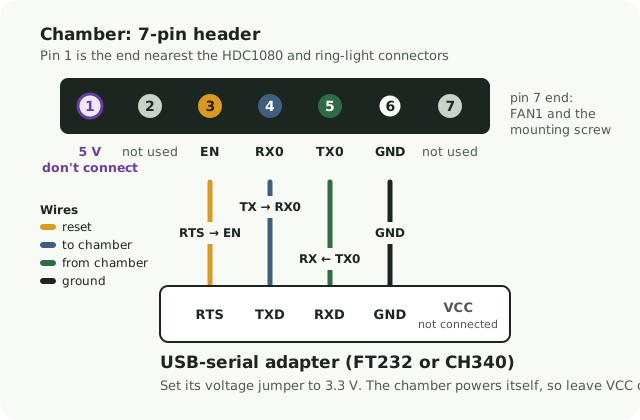
Connect
Hold the button on the back of the chamber, click Connect, choose your adapter, and keep holding until the status says Connected. Holding the button puts the chip into download mode.
Don't hold the button for long while the chamber is running normally. A long press on the stock firmware wipes its settings.
Stuck? See Help for wiring and download-mode tips.
Back up your chamber
Reads all 4 MB of flash twice and checks that both reads match, then saves the file. Allow about 6 minutes.
- SHA-256
Install AutoMyco
Erases the chip, writes the firmware, then reads it back to check. This also wipes the stock settings, including your saved Wi-Fi password.
Put the chamber on your Wi-Fi
Leave the adapter connected. The flasher sends your Wi-Fi details to the chamber over the same cable. They go straight to the chamber and are never sent anywhere else. AutoMyco has no setup hotspot.
2.4 GHz networks only. Click the name box to pick from the networks the chamber can see.
All set
- Unplug the adapter wires. Leave UVC1 unplugged for now.
- Open the chamber from the iPhone app, Home Assistant, or its own control page.
- Using Home Assistant? Add the chamber within 30 minutes of it powering up. Home Assistant then gives it its own encryption key. Missed the window? Switch the chamber off and on again.
Later, without a computer: the chamber also accepts Wi-Fi over Bluetooth from the Home Assistant app or improv-wifi.com (Chrome). When it asks you to authorize, press the button on the back of the chamber once, briefly (a 5-second hold starts the self-test instead). It works within 30 minutes of the chamber starting up; after that, unplug it for 10 seconds first.