 AutoMyco
Help
Answers to the questions people hit while reviving a TS-01. Still stuck? Send me a message at the bottom.
Can I install without opening the chamber or using wires?
Yes. The no-wire install works over Bluetooth from Chrome on a computer or Android phone. Hold the button on the back for about 3 seconds, let go, then follow the page. If anything goes wrong part-way, your chamber stays on the stock firmware and the wired install still works.
The no-wire install can't find my chamber
Hold the button on the back for about 3 seconds and let go, then click Find my chamber within 5 minutes. Stay within a few metres, and make sure Bluetooth is on. If the chamber already runs AutoMyco, it won't show up there. Use the iPhone app or Home Assistant to update it instead.
What do I need for the wired install?
A 3.3 V USB-serial adapter (FT232 or CH340), four jumper wires, and a computer with Chrome or Edge. On Android, Chrome works with a CH340 adapter and a USB-C OTG cable. Budget about $10 if you have none of it, and 30 minutes.
Which pins do I connect for the wired install?
On the 7-pin programming header: adapter GND to pin 6, adapter RX to pin 5 (TX0), adapter TX to pin 4 (RX0), and adapter RTS to pin 3 (EN). Pin 1 is the end nearest the HDC1080 and ring-light connectors, and it carries 5 V, so leave it alone. Set the adapter to 3.3 V and don't connect its VCC pin.
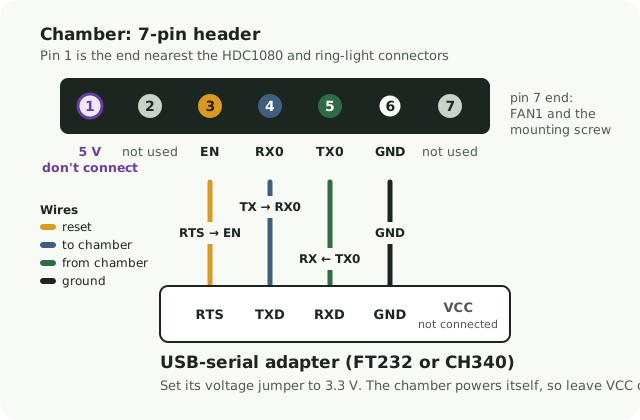
The wired flasher says the chip didn't answer
Hold the button on the back of the chamber, click Connect, and keep holding until it says Connected. That's what puts the chip into download mode. If it still fails, check that TX and RX are crossed (adapter TX to chamber RX), that the adapter is on 3.3 V, and that no other program has the port open.
The two backup reads don't match
The connection is dropping bytes. Use shorter jumper wires, reseat them, and run the backup again. The flasher won't write anything until two reads match, so nothing has changed on your chamber.
Why unplug the UV-C lamp?
UV-C light damages eyes. Nobody has measured yet what the lamp output does while the chip sits in download mode, so it stays unplugged for every wired flash. AutoMyco never turns the lamp on by itself; only you can, from the app, after a warning.
How does the chamber get on my Wi-Fi?
Right after installing, the flasher sends your Wi-Fi name and password to the chamber over the same cable. They go only to the chamber. Later you can also set Wi-Fi over Bluetooth from the Home Assistant app or improv-wifi.com: when it asks you to authorize, press the button on the back of the chamber once, briefly. Don't hold it: a 5-second hold starts the self-test. This works within 30 minutes of the chamber starting up; after that, unplug it for 10 seconds first. There's no open setup hotspot.
How do I update it later?
Over Wi-Fi. Add the chamber to Home Assistant within 30 minutes of powering it up, so it gets its own encryption key, then update from Home Assistant, or from the iPhone app (Settings, then Update firmware) once you've set an update password. Without Home Assistant, reinstall over the cable with the flasher.
Can I go back to the stock firmware?
Only if you made a backup, and only the wired install makes one. Write it back over the same wiring with esptool:
esptool --chip esp32 -p <your-port> write-flash 0x0 ts01-backup-<id>-<date>.bin
The no-wire install doesn't make a backup, because Bluetooth can't read the chip. Want a way back? Use the wired install instead. Keep in mind the stock firmware still needs Terrashroom's cloud, which is gone, so going back gets you very little.
The low-water warning is wrong
On some units the water-level probe reads dry even with a full tank. Set Water Sensing to Humidity Response. The chamber then judges the tank by whether misting actually raises the humidity.
Does it send anything to you?
A little, so updates and recipes work. By default the firmware contacts beezy.ninja for two things: every 6 hours it checks for firmware updates, sending a random ID the chamber made for itself and its firmware version (so updates can roll out in stages), and once a day it fetches grow recipes, sending nothing about the chamber. You can switch update checks off with its Check for Updates setting. It also asks public internet time servers for the current time. Two more switches send more, and both are off by default: Anonymous Check-in sends a random ID and the firmware version once a day so I can count how many chambers are still running, and Share Diagnostics sends health reports. This website stores your email, what you downloaded, and when you accepted the terms. See Privacy Terms.
Is this made by Terrashroom?
No. AutoMyco is an independent community project, not affiliated with Terrashroom.
How far along is it?
The firmware has run on my own chamber since early October 2026. Version 1.1.0, the one you download here, is the second release (what's new). The no-wire install has been tested on a real chamber. Turn on update emails on your downloads page to hear about fixes and new versions.
Send me a message
Sign in first. It's how I reply, and it keeps spam out.
Sign in